Objects / ASSET REFERENCE
Neon transit
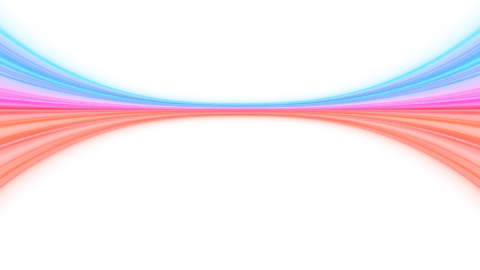
Joined neon trails carry light outward on both sides.
/v1/assets/neon-transit.js
Before you start
A browser ES module, with the renderer and required textures included. No npm install, ZIP or import map is required. Keep rendering code in a client component when using a server-rendered framework.
The authored motion repeats every 10 timeline seconds at speed 1.
Usage
A complete HTML example with custom settings. Remove the settings argument to use the authored defaults.
<div id="hero-art" style="width:100%;height:460px"></div>
<script type="module">
  import { mount } from
    'https://motion.pictographic.ai/v1/assets/neon-transit.js';

  const art = await mount('#hero-art', {
    "color": "#9b87ff",
    "speed": 0.7
  });
  // art.pause(); art.play(); art.seek(0);
  // When removing the component: art.destroy();
</script>
Configuration and defaults
These are the standalone asset defaults. Pass settings to mount(target, settings, options) or update them with art.configure(settings). Colors use six-digit #rrggbb strings. Objects have transparent surroundings unless you request a background.
art.configure({
  "color": "#9b87ff",
  "speed": 0.7
});| Setting / type | Default | What it does |
|---|---|---|
namestring | "Neon transit" | A label for this layer in the scene snapshot; it does not draw page text. Up to 60 Unicode characters; excess content is trimmed. |
visibleboolean | true | Show or hide this layer. |
opacitynumber | 1 | Layer opacity. 0 is transparent; 1 is fully opaque. Suggested: 0 to 1. Finite values outside this range are retained. |
colorstring | "#1000ff" | Upper ribbons. |
color2string | "#ff0800" | Lower ribbons. |
color3string | "#ff00ce" | Middle ribbons. |
color4string | "#00dcff" | Cyan rails. |
trailLengthnumber | 3 | Extent of the neon trails beyond the join. Suggested: 1 to 8. Finite values outside this range are retained. |
spreadnumber | 0.56 | Fan spread. Suggested: 0 to 1. Finite values outside this range are retained. |
joinWidthnumber | 0.022 | Width of the central join. Suggested: 0.003 to 0.08. Finite values outside this range are retained. |
centerGapnumber | 0 | Fade around the center join. Suggested: 0 to 0.65. Finite values outside this range are retained. |
curvaturenumber | 2.55 | Curvature of the neon trails. Suggested: 1 to 4. Finite values outside this range are retained. |
sizenumber | 1 | Trail width multiplier. Suggested: 0.4 to 2. Finite values outside this range are retained. |
glownumber | 1 | Glow or highlight strength. Suggested: 0 to 2. Finite values outside this range are retained. |
intensitynumber | 0.7 | Traveling light strength. Suggested: 0 to 1.5. Finite values outside this range are retained. |
xnumber | 0 | Horizontal placement. For objects, scene units; for backgrounds, pattern offset. Suggested: -12 to 12. Finite values outside this range are retained. |
ynumber | 0 | Vertical placement. For objects, scene units; for backgrounds, pattern offset. Suggested: -8 to 8. Finite values outside this range are retained. |
znumber | 0 | Depth in scene units. The camera looks toward the scene from positive Z. Suggested: -8 to 8. Finite values outside this range are retained. |
rxnumber | 0 | Tilt around the X axis, in degrees. Suggested: -180 to 180. Finite values outside this range are retained. |
rynumber | 0 | Tilt around the Y axis, in degrees. Suggested: -180 to 180. Finite values outside this range are retained. |
rotationnumber | 0 | Rotation in the canvas plane, in degrees. Suggested: -180 to 180. Finite values outside this range are retained. |
scalenumber | 1 | Uniform scale multiplier. 1 is the authored size. Suggested: 0.1 to 3. Finite values outside this range are retained. |
mobileobject | {} | Portrait overrides when container width / height < 1. x, y and rotation add to the base transform; scale multiplies it. Example: {x: 0, y: -1, scale: 0.8, rotation: 0}. |
playingboolean | true | Whether this layer advances when the instance is playing. art.play() does not override a layer set to false. |
speednumber | 1 | Timeline multiplier: 1 is normal, 0 freezes time, negative values rewind. Introductory effects may stop at the start of their timeline. Suggested: 0 to 3. Finite values outside this range are retained. |
Runtime options
Pass these separately from artwork settings. Asset modules use mount(target, settings, options); mix modules use mount(target, options). A target can be a CSS selector or an HTML element.
| Setting / type | Default | What it does |
|---|---|---|
autoplayboolean | "system preference" | Omit to respect prefers-reduced-motion. true starts the instance playing; false starts it paused. Layers with playing: false still need that setting changed. |
backgroundhex color | false | false | Canvas clear color. false keeps otherwise empty areas transparent. Existing opaque background layers still cover the clear color. |
onWarningfunction | "console.warn" | Receives advisory messages when configure() gets numeric values outside suggested ranges. |
onErrorfunction | "not set" | Receives renderer errors. Also catch the promise returned by mount() for setup errors. |
pauseWhenOffscreenboolean | true | Suspend automatic animation frames and timeline advancement when the container leaves the viewport. Playback resumes on return. false allows off-screen playback; hidden browser tabs always suspend automatic rendering. |
maxFpsnumber | 0 | Optional rendering frame-rate cap. 0 uses the browser refresh rate. Any finite nonnegative number is accepted; lower values reduce rendering work. This does not change the configured animation speed. |
pixelRationumber | "automatic" | Optional drawing-buffer resolution multiplier. Omit for the authored detail policy; 1 uses one rendered pixel per CSS pixel. Any positive finite number is accepted. High values increase GPU work. |
preserveDrawingBufferboolean | true | Keep the rendered canvas available for pixel reads or toDataURL(). Set false for a live display that does not need canvas readback. |
Playback, resizing and cleanup
Wait for mount() before using the instance. It resolves after required textures are ready. The container must have a height or aspect ratio; its size drives the canvas. Resizing is automatic. Keep HTML headings and buttons outside the artwork canvas.
art.configure({ opacity: 0.8 }); // All layers; optional second argument targets a layer ID
art.pause();
art.play();
art.seek(4); // Timeline seconds, multiplied by each layer's speed
art.resize(); // Optional manual resize
console.log(art.time, art.playing, art.scene); // scene is a copy
await art.setScene({ layers: [{ asset: 'solid', color: '#10182c' }] });
art.destroy(); // Call when removing the component; releases the canvas and GPU resources
Numerical ranges are suggestions, not clamps. Use finite JavaScript numbers; NaN and Infinity are rejected. Large counts or extreme values can slow rendering or move artwork out of view. Enum choices and text/color formats still apply. Unknown setting names are ignored. Each instance is independent.